Areas and Virtual Links
A distinctive feature of OSPF is the possibility to divide an AS into multiple routing areas, each with its own set of neighbors. Imagine a large network with 300+ routers and multiple links between them. Whenever a link flaps or some other topology change happens in the network, this change is flooded to all OSPF devices in the network. This results in a heavy load on the network and even downtime because network convergence can take some time for such a large network.
A large single-area network can produce serious issues:
- Each router recalculates the database whenever a network topology change occurs. The process takes CPU resources.
- Each router holds an entire link-state database, which shows the topology of the entire network. It takes memory resources.
- A complete copy of the routing table and the number of routing table entries can be significantly greater than the number of networks, which can take even more memory resources.
- Updating large databases requires more bandwidth.
The introduction of areas allows for better resource management because a topology change inside one area is not flooded to other areas in the network. The concept of areas enables simplicity in network administration and routing summarization between areas, significantly reducing the database size to store on each OSPF neighbor. This means each area has its own link-state database and corresponding shortest-path tree. For more information on how OSPF neighbors discover each other and synchronize databases, see Neighbor Relationship.
The structure of an area is invisible to other areas. This isolation of knowledge makes the protocol more scalable if multiple areas are used. Routing table calculation takes fewer CPU resources and routing traffic is reduced.
However, multi-area setups create additional complexity. You should not separate areas with fewer than 50 routers. The maximum number of routers in one area is mostly dependent on the CPU power you have for routing table calculation.
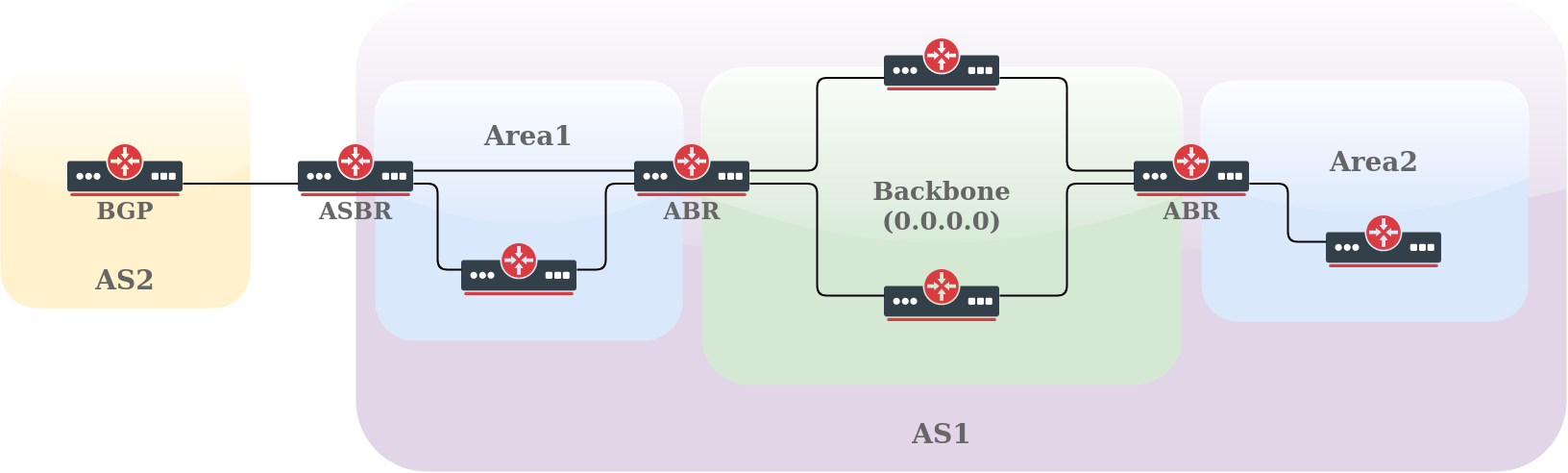
An OSPF area has a unique 32-bit identification (Area ID). The area with an Area ID of 0.0.0.0 (called the Backbone area) is the main area where any other area should connect. Routers connecting to more than one area are called ABR (Area Border Routers), and their main responsibility is summarization and update suppression between connected areas. The router connecting to another routing domain is called ASBR (Autonomous System Boundary Router).
Each area has its own link-state database, consisting of router-LSAs and network-LSAs describing how all routers in that area are interconnected. Detailed knowledge of the area's topology is hidden from all other areas. Router-LSAs and network-LSAs are not flooded beyond the area's borders. Area Border Routers (ABRs) leak addressing information from one area into another in OSPF summary-LSAs. This allows the router to pick the best area border router when forwarding data to destinations from another area and is called intra-area routing. For more information on how the routing table is calculated, see Routing Table Calculation.
Routing information exchange between areas is essentially a Distance Vector algorithm. To prevent algorithm convergence problems, such as counting to infinity, all areas are required to attach directly to the backbone area, creating a simple hub-and-spoke topology. The area-ID of the backbone area is always 0.0.0.0 and cannot be changed. For more information on the routing decision process, see Routing Decision.
Configure RouterOS areas in the /routing/ospf/area menu. For example, a configuration of an ABR router with multiple attached areas, one Stub area, and one default area:
/routing/ospf/area
add name=backbone_v2 area-id=0.0.0.0 instance=v2inst
add name=stub_area area-id=1.1.1.1 instance=v2inst type=stub
add name=another_area area-id=2.2.2.2 instance=v2inst type=default
OSPF can have 5 types of areas, configured by the type parameter. Each area type defines what type of LSAs the area supports:
- Standard/default - OSPF packets can be transmitted in this area. It supports types 1, 2, 3, 4, and 5 LSAs.
- Backbone - As already mentioned, this is the main area where any other area connects. It is basically the same as the standard area but identified with ID 0.0.0.0.
- Stub - This area does not accept any external routes.
- Totally stubby - A variation of the stub area.
- Not-so-stubby (NSSA) - A variation of the stub area.
LSA Types
Before continuing with a detailed look at each area type, familiarize yourself with LSA types:
- type 1 - (Router LSA) Sent by routers in the area, including the list of directly attached links. These LSAs do not cross the ABR or ASBR.
- type 2 - (Network LSA) Generated for every "transit network" in an area. A transit network has at least two directly attached OSPF routers. Ethernet is an example of a transit network. A Type 2 LSA lists each of the attached routers making up the transit network and is generated by the DR.
- type 3 - (Summary LSA) The ABR sends Type 3 Summary LSAs. A Type 3 LSA advertises any networks owned by an area to the rest of the areas in the OSPF AS. By default, OSPF advertises Type 3 LSAs for every subnet defined in the originating area, which can cause flooding problems. You should use a manual summarization at the ABR.
- type 4 - (ASBR-Summary LSA) Announces the ASBR address and shows where the ASBR is located, announcing its address instead of its routing table.
- type 5 - (External LSA) Announces the routes learned through the ASBR and is flooded to all areas except Stub areas. This LSA divides into two sub-types: external type 1 and external type 2.
- type 6 - (Group Membership LSA) Defined for multicast extensions to OSPF and is not used by RouterOS.
- type 7 - Type 7 LSAs inform the ABRs about external routes imported into the NSSA area. The Area Border Router then translates these LSAs to type 5 external LSAs and floods them to the rest of the OSPF network.
- type 8 - External Attributes LSA (OSPFv2) / link-local LSA (OSPFv3).
- type 9 - Link-Local Scope Opaque (OSPFv2) / Intra Area Prefix LSA (OSPFv3). LSAs of this type are not flooded beyond the local (sub)network.
- type 10 - Area Local Scope Opaque. LSAs of this type are not flooded beyond the scope of their associated area.
- type 11 - Opaque LSA which is flooded throughout the AS (scope is the same as type 5). It is not flooded in stub areas and NSSAs.
Without any ASBRs, the network has no LSA Types 4 and 5.
Standard Area
This area supports 1, 2, 3, 4, and 5 LSAs.
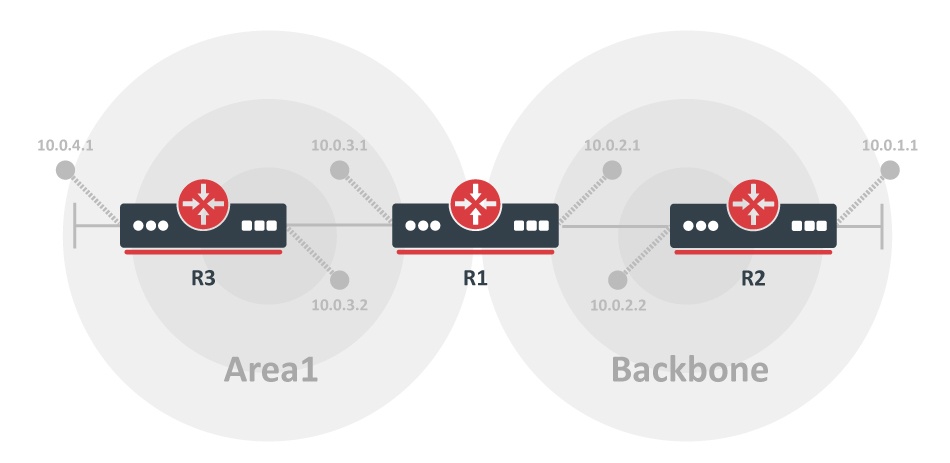
A simple multi-area network with the default area. In this example, all networks from area1 are flooded to the backbone, and all networks from the backbone are flooded to area1.
R1
/ip/address/add address=10.0.3.1/24 interface=ether1
/ip/address/add address=10.0.2.1/24 interface=ether2
/routing/ospf/instance
add name=v2inst version=2 router-id=1.0.0.1
/routing/ospf/area
add name=backbone_v2 area-id=0.0.0.0 instance=v2inst
add name=area1 area-id=1.1.1.1 type=default instance=v2inst
/routing/ospf/interface-template
add networks=10.0.2.0/24 area=backbone_v2
add networks=10.0.3.0/24 area=area1
R2
/ip/address/add address=10.0.1.1/24 interface=ether2
/ip/address/add address=10.0.2.2/24 interface=ether1
/routing/ospf/instance
add name=v2inst version=2 router-id=1.0.0.2
/routing/ospf/area
add name=backbone_v2 area-id=0.0.0.0
/routing/ospf/interface-template
add networks=10.0.2.0/24 area=backbone_v2
add networks=10.0.1.0/24 area=backbone_v2
R3
/ip/address/add address=10.0.3.2/24 interface=ether2
/ip/address/add address=10.0.4.1/24 interface=ether1
/routing/ospf/instance
add name=v2inst version=2 router-id=1.0.0.3
/routing/ospf/area
add name=area1 area-id=1.1.1.1 type=stub instance=v2inst
/routing/ospf/interface-template
add networks=10.0.3.0/24 area=area1
add networks=10.0.4.0/24 area=area1
Stub Area
The main purpose of stub areas is to prevent such areas from carrying external routes. Routing from these areas to the outside world is based on a default route. A stub area reduces the database size in an area and the memory requirements of routers in the area.
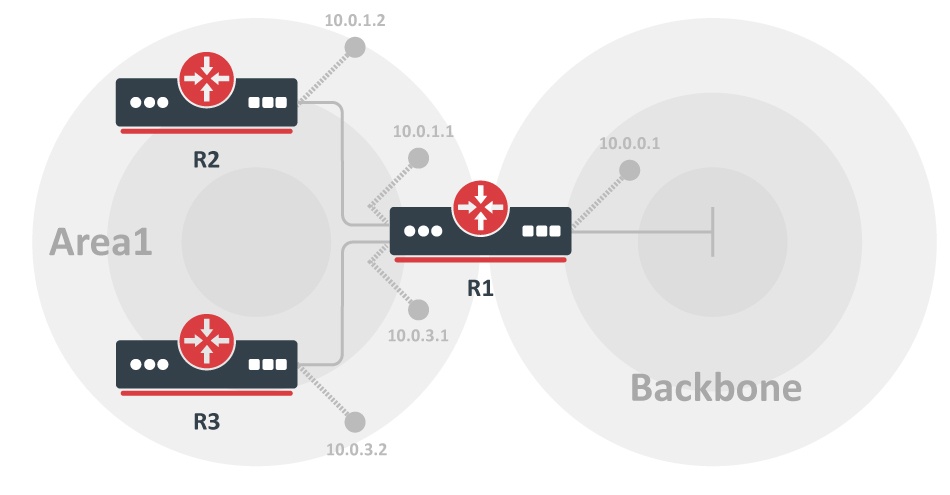
The stub area has a few restrictions. ASBR routers cannot be internal to the area, and the stub area cannot be used as a transit area for virtual links. These restrictions exist because the stub area is configured not to carry external routes.
This area supports 1, 2, and 3 LSAs.
Consider the previous example. Area1 is configured as a stub area, meaning routers R2 and R3 will not receive any routing information from the backbone area except the default route.
R1:
/routing/ospf/instance
add name=v2inst version=2 router-id=1.0.0.1
/routing/ospf/area
add name=backbone_v2 area-id=0.0.0.0 instance=v2inst
add name=area1 area-id=1.1.1.1 type=stub instance=v2inst

/routing/ospf/interface-template
add networks=10.0.0.0/24 area=backbone_v2
add networks=10.0.1.0/24 area=area1
add networks=10.0.3.0/24 area=area1
R2:
/routing/ospf/instance
add name=v2inst version=2 router-id=1.0.0.2
/routing/ospf/area
add name=area1 area-id=1.1.1.1 type=stub instance=v2inst
/routing/ospf/interface-template
add networks=10.0.1.0/24 area=area1
R3:
/routing/ospf/instance
add name=v2inst version=2 router-id=1.0.0.3
/routing/ospf/area
add name=area1 area-id=1.1.1.1 type=stub instance=v2inst
/routing/ospf/interface-template
add networks=10.0.3.0/24 area=area1
If the default-cost parameter is not set, then stub area type-3 default LSA will not be originated.
Totally Stubby Area
A totally stubby area is an extension of the stub area. A totally stubby area blocks external routes and summarized (inter-area) routes from going into the area. Only intra-area routes are injected into the area. A totally stubby area is configured as a stub area with an additional no-summaries flag. This area supports Type 1, Type 2 LSAs, and Type 3 LSAs with default routes.
/routing/ospf/area
add name=totally_stubby_area area-id=1.1.1.1 instance=v2inst type=stub no-summaries
NSSA
Not-so-stubby area (NSSA) applies when external route injection is required, but injection of type 5 LSA routes is not. See also Understanding OSPF for the NSSA RFC reference.
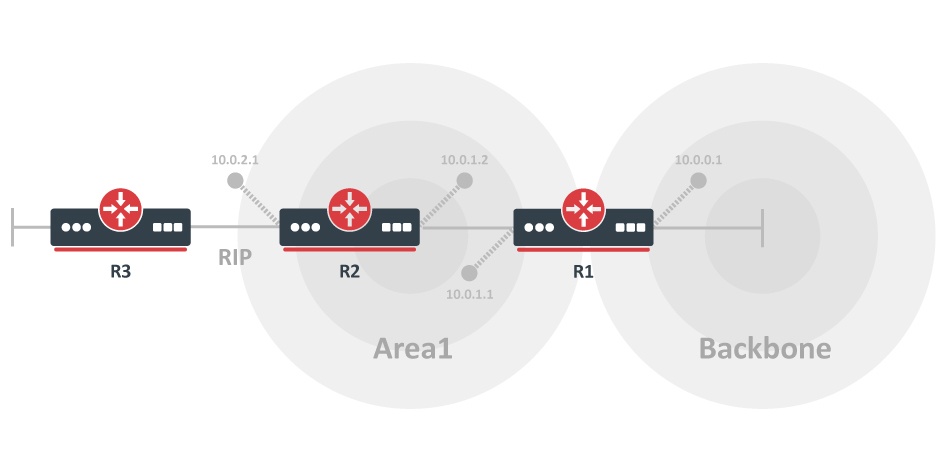
The illustration shows two areas (backbone and area1) and a RIP connection to the router located in area1. Area1 must be configured as a stub area, but external RIP routes must also be injected into the backbone. Area1 should be configured as NSSA in this case.
The configuration example does not cover RIP configuration.
R1
/routing/ospf/instance
add name=v2inst version=2 router-id=1.0.0.1
/routing/ospf/area
add name=backbone_v2 area-id=0.0.0.0 instance=v2inst
add name=area1 area-id=1.1.1.1 type=nssa instance=v2inst
/routing/ospf/interface-template
add networks=10.0.0.0/24 area=backbone_v2
add networks=10.0.1.0/24 area=area1
R2
/routing/ospf/instance
add name=v2inst version=2 router-id=1.0.0.2
/routing/ospf/area
add name=area1 area-id=1.1.1.1 type=nssa instance=v2inst
/routing/ospf/interface-template
add networks=10.0.1.0/24 area=area1
Virtual links cannot be used over NSSA areas. Use the nssa-translator parameter to control type-7 to type-5 LSA translation.
External Routing Information and Default Route
On the edge of an OSPF routing domain, you can find routers called AS boundary routers (ASBRs) that run one of the other routing protocols. The job of those routers is to import routing information learned from other routing protocols into the OSPF routing domain. External routes can be imported at two separate levels depending on the metric type.
- Type1 - OSPF metric is the sum of the internal OSPF cost and the external route cost.
- Type2 - OSPF metric is equal only to the external route cost.
Type 1 external paths are always preferred over type 2 external paths. When all paths are type 2 external paths, the paths with the smallest advertised type 2 metric are always preferred. (RFC2328)
External routes can be imported in several ways and processed in the listed order:
- Select routes that match the
redistributeororiginate-defaultinstance parameter. - If an output routing filter chain is specified:
- If the
redistributeororiginate-defaultparameter was used, process only selected routes. - Otherwise, process all active routes.
- If the
- Process selected routes in the
out-filter-select.
A routing filter is still necessary to set route cost and type (when needed).
The configuration example picks and redistributes all static and RIP routes:
/routing/ospf/instance
add name=v2inst version=2 router-id=1.2.3.4 redistribute=static,rip
Redistribution of the default route is a special case where the originate-default parameter should be used:
/routing/ospf/instance
set v2inst originate-default=if-installed
When redistribution is controlled by the originate-default and redistribute parameters, it introduces some corner cases for default route filtering.
- If
redistributeis enabled, pick all routes matching the redistribute parameters. - If
originate-default=never, a default route will be rejected. - Run selected routes (or all routes if the redistribute parameter is not set) through
out-filter-select(if configured). - Run selected routes through
out-filter-chain(if configured). See/routing/filterfor the routing filter reference. - If
originate-defaultis set toalwaysorif-installed:- OSPF creates a fake default route without attributes.
- Run this route through
out-filter-chainwhere attributes can be applied, but the action is ignored (always accept).
For a complete list of redistribution values, see /routing/ospf/instance.
Route Summarization
Route summarization is a consolidation of multiple routes into one single advertisement. It is done at the area boundaries (Area Border Routers).
You should summarize in the direction of the backbone. That way, the backbone receives all the aggregated routes and injects them into other areas already summarized. Two types of summarization exist: inter-area and external route summarization.
Inter-area route summarization works on area boundaries (ABRs). It does not apply to external routes injected into OSPF by using redistribution. By default, the ABR creates a summary LSA for each route in a specific area and advertises it in adjacent areas.
Ranges allow creating only one summary LSA for multiple routes and sending only a single advertisement into adjacent areas, or suppressing advertisements altogether.
If a range is configured with the advertise parameter, a single summary LSA is advertised for each range if the specific area has any routes under the range. Otherwise (when the advertise parameter is disabled), no summary LSAs are created and advertised outside area boundaries.
Inter-area route summarization can be configured from the /routing/ospf/area/range menu.
Consider two areas, backbone and area1. Area1 has several /24 routes from the 10.0.0.0/16 range, and you do not have to flood the backbone area with each /24 subnet when it can be summarized. On the router connecting area1 with the backbone, you can set up the area range:
/routing/ospf/area/range
add prefix=10.0.0.0/16 area=area1 advertise=yes cost=10
See /routing/ospf/area/range for the advertise and cost parameter references.
For an active range (i.e. one that has at least one OSPF route from the specified area falling under it), a route with the type 'blackhole' is created and installed in the routing table.
External route summarization can be achieved by using routing filters. Consider the same example as the previous one, except area1 has redistributed /24 routes from other protocols. To send a single summarized LSA, add a blackhole route and configure an appropriate /routing/filter/rule to accept only the summarized route:
/ip/route/add dst-address=10.0.0.0/16 blackhole
/routing/ospf/instance
set v2inst out-filter-chain=ospf_out
/routing/filter/rule
add chain=ospf_out rule="if (dst == 10.0.0.0/16) {accept} else {reject}"
Virtual Link
All OSPF areas must be attached to the backbone area, but sometimes the physical connection is not possible. To overcome this limitation, areas can be attached logically by using virtual links.
There are two common scenarios when virtual links can be used:
- To glue together the fragmented backbone area.
- To connect a remote area without a direct connection to the backbone.
Partitioned Backbone
OSPF allows linking of discontinuous parts of the backbone area by using virtual links. This might be required when two separate OSPF networks are merged into one large network. Virtual links can be configured between separate ABRs touching the backbone area from each side and having a common area.
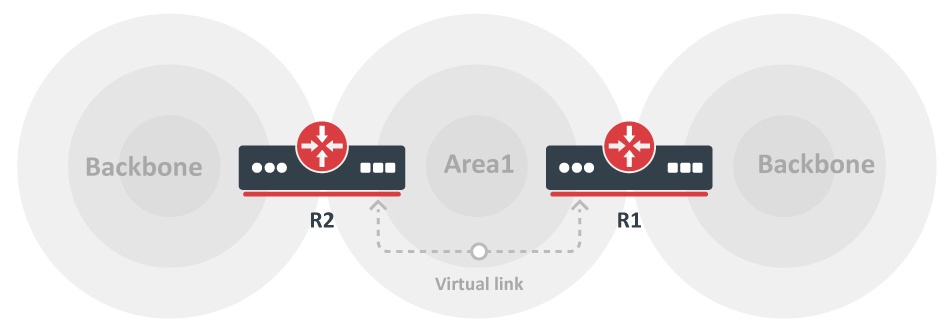
The additional area could be created to become a transit area when a common area does not exist. It is illustrated in the previous image.
Virtual links are not required for non-backbone areas when they get partitioned. OSPF does not actively attempt to repair area partitions. Each component simply becomes a separate area when an area becomes partitioned. The backbone performs routing between the new areas. Some destinations are reachable through intra-area routing. The area partition requires inter-area routing.
However, to maintain full routing after the partition, an address range must not be split across multiple components of the area partition. Consider using BFD for faster failure detection on virtual links.
No Physical Connection to a Backbone
An area might not have a physical connection to the backbone. A virtual link provides a logical path to the backbone for the disconnected area. A link must be established between two ABRs sharing a common area, with one ABR connected to the backbone.
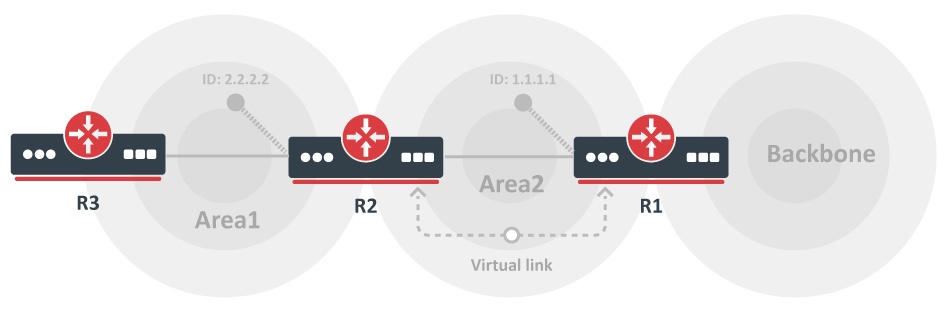
Both R1 and R2 are ABRs, and R1 is connected to the backbone area. Area2 will be used as a transit area, and R1 is the entry point into the backbone area. A virtual link must be configured on both routers.
Add virtual link configuration in the /routing/ospf/interface menu. The vlink-transit-area and vlink-neighbor-id parameters must be configured on both routers. The configuration based on the diagram is as follows:
R1:
/routing/ospf/interface
add vlink-transit-area=area2 area=backbone_v2 type=virtual-link vlink-neighbor-id=2.2.2.2
R2:
/routing/ospf/interface
add vlink-transit-area=area2 area=backbone_v2 type=virtual-link vlink-neighbor-id=1.1.1.1